(Using the JDBC-ODBC bridge)
A video tutorial is also available
Click here to watch
ODBC can be used to connect on any databases though processing is slow... but it would still be very helpful, and that's what were gonna use to connect a JAVA Program to an MS Access Database.
We'll be using Northwind Database, a sample database made by Microsoft Corporation for learning purposes. A database of this is also available in SQL server 2000. Click on the link to download the mdb File:
1. Configure the ODBC Settings
a. Go to Control Pane, then Choose Administrative Tools >> Datasources(ODBC)

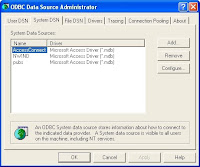
b. In the ODBC Dialog box, choose the System DSN tab, then click the [Add] button.
c. A Dialog box appears, choose Microsoft Access Driver (*.mdb)
(Extension name Depends on what version of MS access you are using, in this article, we'll refer to Microsoft Access 2000)
Then choose [finish].
c. Another Dialog box will open. Fill up the Data Source name with the name you want. This will be used on Step # 2
(In this example, we will be naming this NWIND for the sample source code). Then on the Database Panel, click [Select] and browse for your database file.
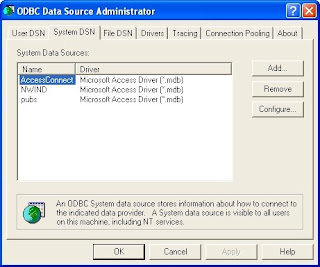
d. Click the OK Button and you will see that your database has been added in the System Data Sources List.
2. The Source Code
Here's a sample code I got from the book, Thinking in JAVA by Bruce Eckel. I've modified some of its parts so that it will work on our sample database, Northwind.
//: c15:jdbc:JLookup.java
// Looks up email addresses in a
// local database using JDBC.
import java.sql.*;

public class JLookup
{
public static void main(String[] args)
throws ClassNotFoundException {
try{
String dbUrl = "jdbc:odbc:NWIND";
String user = "";
String password = "";

// Load the driver (registers itself)
Class.forName(
"sun.jdbc.odbc.JdbcOdbcDriver");
Connection c = DriverManager.getConnection(
dbUrl, user, password);
Statement s = c.createStatement();
// SQL code:
ResultSet r =
s.executeQuery(
"SELECT * " +
"FROM Products");

while(r.next()) {
// Capitalization doesn't matter:
System.out.println(
r.getString("ProductID") + " " +
r.getString("ProductName"));
}
s.close(); // Also closes ResultSet
}
catch(SQLException se)
{
System.err.println(se);
}
}
}
*From Thinking in JAVA, www.bruceeckel.com
Another code that makes use on the JOptionPane. Some parts of it are simplified (if you find the Objects and Indentations a fuss on the previous example)
By Mykell Dick Soria
import javax.swing.*;
import java.sql.*;
import java.io.*;
public class ConnectionTask
{

private JTextArea txtView;
private JScrollPane jsp;

public ConnectionTask(){
txtView = new JTextArea(20,30);
txtView.setEditable(false);
jsp = new JScrollPane(txtView);

try{
Class.forName("sun.jdbc.odbc.JdbcOdbcDriver");

Connection jereme = DriverManager.getConnection("jdbc:odbc:NWIND","","");
Statement jer = jereme.createStatement();

jer.executeQuery("SELECT * FROM Customers");
ResultSet je = jer.getResultSet();

while(je.next())
{
txtView.append(je.getString(1) + "\n" + je.getString(2) + "\n" + je.getString(3) + "\n");
}
JOptionPane.showMessageDialog(null, jsp, "Database Products", JOptionPane.INFORMATION_MESSAGE);
}catch(Throwable exp){

JOptionPane.showMessageDialog(null,exp,"Error",JOptionPane.ERROR_MESSAGE);
System.err.println(exp);
}
}

public static void main(String[] args){
ConnectionTask app = new ConnectionTask();
}
}
Well, you'll know if you're doing right if your program displays the content you selected. The catch statement will display any errors about the connection
Exceptions Used In the Programs:
1. ClassNotFoundException
2 . SQLException
3. Throwable (if you've included this, you don't need to bother putting the first two)
4. IOException - though not in the example, according to Mr. Soria, it can also be substituted for SQLException.
enjoy! :D


