
Showing posts with label Downloads. Show all posts
Showing posts with label Downloads. Show all posts
Tuesday, September 21, 2010

Thursday, April 8, 2010
Query Displayer JAVA Program
As a continuation for my earlier post in JDBC, here is a sample program I got from Java™ How to Program, by H.M. Deitel,

It looks like a query analyzer. You can use this to test the retrieval of data.
You can download the source at:
Query Displayer.zip
Just modify the following lines of code on DisplayQueryResults.java
For a copy of the ebook Java how to Program, visit
javaforbidden.4shared.com
The password is: itspot
(shhh... please don't tell them about this, ok?)

It looks like a query analyzer. You can use this to test the retrieval of data.
You can download the source at:
Query Displayer.zip
Just modify the following lines of code on DisplayQueryResults.java
static final String JDBC_DRIVER = "sun.jdbc.odbc.JdbcOdbcDriver";
static final String DATABASE_URL = "jdbc:odbc:NWIND";
static final String USERNAME= "";
static final String PASSWORD= "";

// default query selects all rows from authors table
static final String DEFAULT_QUERY = "SELECT * FROM Products";
For a copy of the ebook Java how to Program, visit
javaforbidden.4shared.com
The password is: itspot
(shhh... please don't tell them about this, ok?)
Sunday, March 28, 2010
Detailed Instructions on How to Download SharpDevelop and .NET Framework 3.5 SP1
This is the first time I do the posting here. The guy who is behind this blog (site specifically for all geeks like us) always asks me to post something useful like articles, tutorials and other things which can grasp your interests. Hope you like my first tutorial.


This is the present view (as of March 29, 2010) of the link I provided on his latest post.

To start using SharpDevelop, you need first to download it. Click LABEL 1 (refer to the image above) to download it to your computer. You will be transferred into their download page and save dialog box will appear.
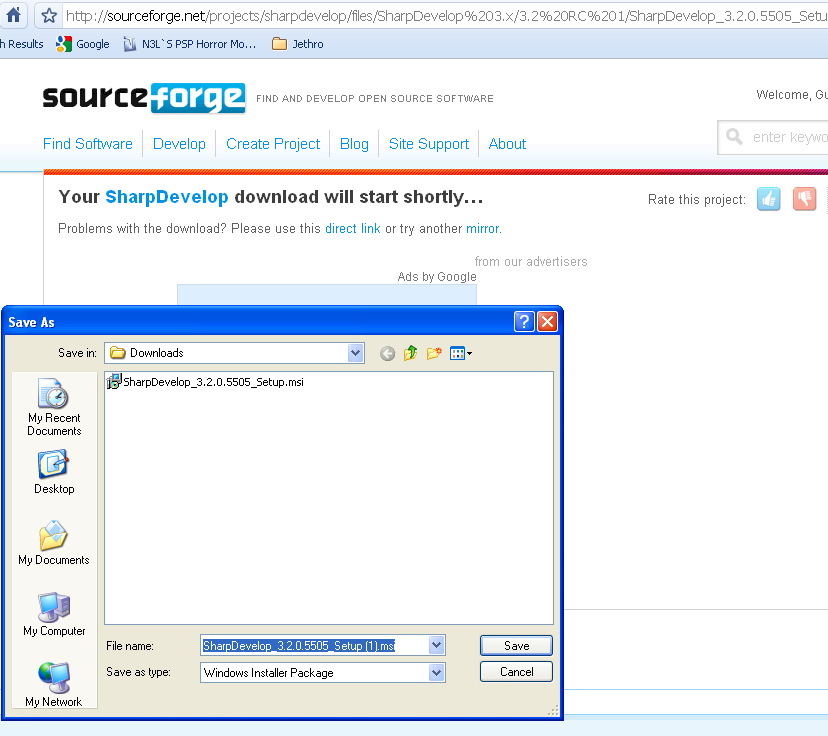
Go to the directory you want this installer to save. Example, I want it to save in c drive.
SharpDevelop_3.2.0.5505_setup.msi will be saved in Local Drive (C:).

After you download it, .NET Framework is also needed in order your program to run. And that is .NET Framework 3.5 SP1 to be specific.
Follow these steps to have it:
1. Click LABEL 2 (refer to the first image above).
2. You will be transferred to this page:

3. Click Download
4. Microsoft download page will load upon doing step 3.

5. If the download does not start after 30 seconds, click the Start Download link.

Save dialog box will appear and asking you where to put it. After choosing the desired location, click save to download it.
6. And voila! You have it.
After you install all of these installers, (.NET Framework should be installed first before the SharpDevelop) you can start using it and develop your first program in whatever programming language you prefer. (either in vb, c# and others)
Hope this tutorial will be a help guys! Have a happy and enjoyable life. See you on my next post! ^^,
Friday, November 13, 2009
Downloadable JAVA EBOOKS
Free JAVA Lectures (Slideshow).exe Free Java Lectures
How to Program in JAVA.rar JAVA How to Program - the password in this ebook is itspot.
This is a fully featured book where you can learn Java. The best book I know in that programming language.

Thinking in JAVA
I have a copy of this book and I find it easy to understand because of the detailed explanation.
The JAVA turoial A short course on the basics.chm This book helped me a lot on projects in school
squidoo.com/itebooks
How to Program in JAVA.rar JAVA How to Program - the password in this ebook is itspot.
This is a fully featured book where you can learn Java. The best book I know in that programming language.
Thinking in JAVA
I have a copy of this book and I find it easy to understand because of the detailed explanation.
The JAVA turoial A short course on the basics.chm This book helped me a lot on projects in school
squidoo.com/itebooks
Saturday, October 10, 2009

Subscribe to:
Posts (Atom)